
Project notes go stale for a boring reason. The work happens in Git and in conversations, and the notes are a second place you have to remember to update. Mine were always a day behind the code. So the app I built for my client work, guwapi notes, doesn’t wait for me to type the update. Claude reads what actually changed, moves the notes whose work is finished to review, and proposes the rest, every change with the commit or pull request that proves it. I approve on the phone, with one tap.
That is what this page is about: how a note updates itself, what Claude is and isn’t allowed to do, and what never leaves the phone. The notebook around it, with its statuses, editor and widgets, comes after, because that is the part every notes app has. The film above shows the whole app in a minute.
How a note updates itself
Say I’ve just merged a pull request that fixes the FAQ page of a client’s website. Before, I’d open the notes, find the right one, change its status and write down what was done, if I remembered. Now I type /notite and the project’s name in Claude, and this happens. In the film the chat is animated; everything on the phone is a real recording, on a real client project:
- Claude reads the project’s notes. Only as much as that folder’s access level allows, and nothing from folders I keep private.
- It checks the work itself. The commits, pull requests and files in the project’s code repository, or what I told it in the conversation.
- It moves statuses. A note whose work is finished goes to To review, never to Done. Done is a decision I make after checking.
- It proposes the rest. A line to add to a note, a checklist item to tick, a step it found that nobody wrote down (a broken link mentioned in a pull request, say), or a new note. Each proposal carries its evidence.
- I accept or reject on the phone. The proposals wait under Claude proposes. Accepting writes them into the note, with the date and a link to the evidence; rejecting drops them. Until then, nothing in the note’s text changes.
The result is a note that reads like a log of the project: Update · 5 Nov · Claude, what was done, and Evidence: commit 8f92b80, a link that opens the commit.
No evidence, no proposal
The whole thing works because of one rule, written into the repository where Claude reads it before every change: if it can’t point to where something happened, it doesn’t propose it. Evidence is something I can open and check in a few seconds: a commit, a pull request, a file and line, a test run, or a quote from our conversation with its date. When there is none, Claude asks me instead of guessing.
The limits are just as strict. Claude never marks work as done on my behalf, never edits a note’s text directly, and never creates, deletes or renames files in the notes repository. It may move statuses and tags, and only after I say yes in the conversation; everything else arrives as a proposal.
What leaves the phone
- notes synced from a folder until you choose its level
- 0
- access levels, set per folder and inherited by subfolders
- 4
- commit per sync, to a private repository you own
- 1
Every folder starts as Private: nothing from it is synced and Claude doesn’t know it exists. You raise the level per folder, and its subfolders follow unless you set them otherwise.
| Level | What Claude can see | What Claude can do |
|---|---|---|
| Private | Nothing. The folder isn’t in the repository. | Nothing. |
| Status | Titles, statuses and tags. | Move statuses and tags. |
| Status + journal | The same, plus a log of dated updates. | Propose updates and new notes, with evidence. |
| Full | The whole note. | Also propose ticks and new steps, which you approve. |
For confidential work there is one more switch, Hide titles. The repository then holds only codes such as ABC-12 and anonymous folder names; the real titles stay on the phone, which matches them back to the codes. Claude can still say “ABC-12 is finished, here is the commit” without ever knowing what ABC-12 is about.
How the sync works
Underneath, it’s plain Git. The app keeps a private GitHub repository with one small Markdown file per note (title, status, tags, and only what the folder’s level allows), a CLAUDE.md with the rules above, and a schema listing the valid statuses and tags. Claude reads and writes that repository with its normal tools; the app syncs with it when it opens, when you pull to refresh, and a few seconds after a change.
Each sync is a single commit made through GitHub’s Git Data API. Files are compared by hash, so notes that didn’t change aren’t rewritten. If the phone and Claude changed the same note, the statuses and tags are merged three ways, so neither side’s edit is lost, and the note shows who moved it: ✦ Claude · In progress → To review. The GitHub token has access to that one repository only and lives in the iPhone’s Keychain; it is never shown again and never written to a file.
This is what it looks like on the phone, close up: a project counting its own progress, a note marked done with its evidence, and the other pieces you’ll meet below.
The notebook underneath
None of this would help if the notes weren’t organised the way client work is. In guwapi notes a client is a folder, a project is a folder inside it, and every note can carry one of five statuses: To do, In progress, To review, Problem and Done.
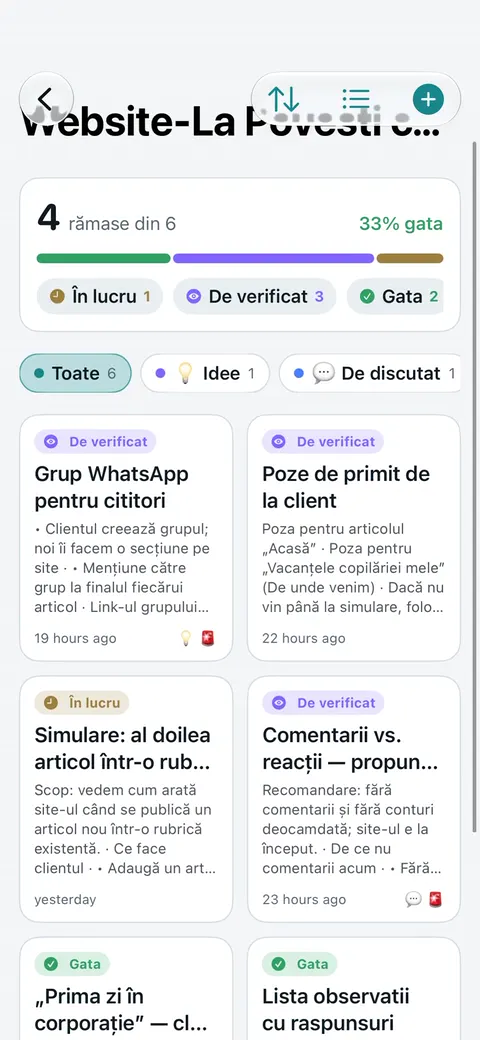
Projects
Open a project and it counts for you: 1 left of 19, 95% done, a segmented progress bar, and the notes grouped by status, with finished work folded away at the bottom. Tap a note’s coloured dot to change its status without opening it, or drag it into another group. When a note goes to Done, the app can clear its tags too, so an Urgent label doesn’t linger on finished work.
Grouping by status is the point: a list sorted by date tells you what you touched last, a list grouped by status tells you what is holding the project up. This film follows a new client from the start, from the folder and its access level to a project that has counted its own progress:
Writing, importing, scanning
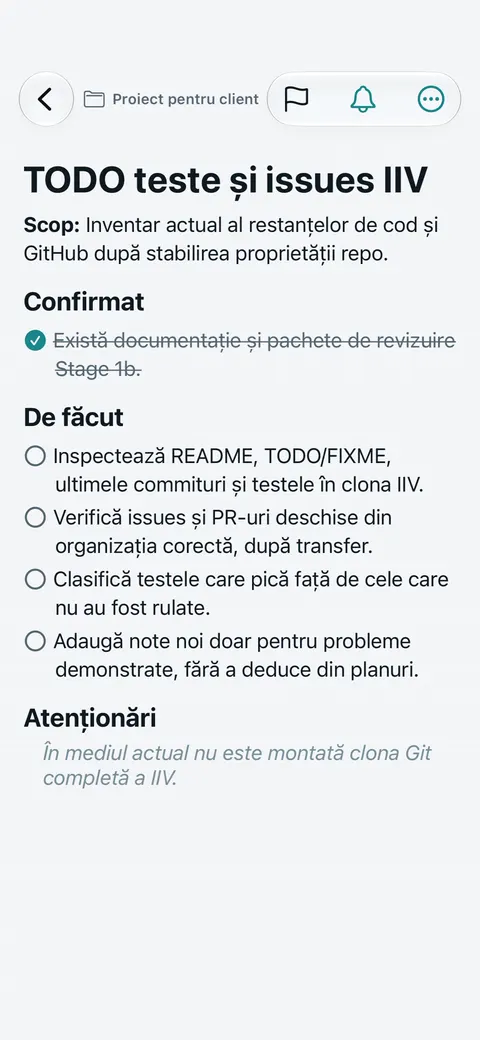
Editor
Notes are rich text rather than Markdown you have to remember: titles, three heading levels and code, bold, italic, colours and highlight, lists and checklists you tick in place. The note’s menu holds the rest: pin it to the lock screen, tags, colour, a reminder, and export to Markdown or PDF.
Notes rarely start in a new app, so the import takes Markdown, plain text, RTF, HTML and PDF, one file or a whole folder with its subfolders. An Obsidian vault comes in as it is. PDFs keep their structure: headings are recognised by font size, lists stay lists, two-column tables become rows, and images land where they were. From the camera, Scan document reads printed or handwritten text on the device with Apple’s Vision framework, rebuilds the paragraphs, and marks the lines it isn’t sure about so you can check them.
The rest is what you’d expect to find, kept small. Five templates (meeting, client brief, deploy checklist, bug report, quick idea) and any note saved as your own. Tags chosen from a list, so they don’t splinter into three spellings of urgent. A colour per note that stays readable in light and dark mode. Reminders that open the note itself, and an order you set by hand when sorting by date or status isn’t what you want.
On the lock screen
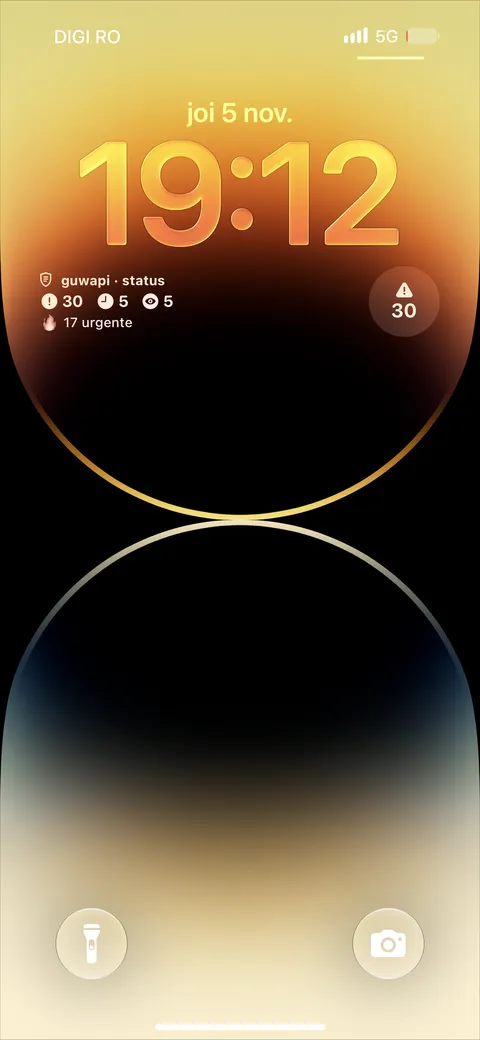
Widgets
The status widget counts, across every project, the open problems, the notes in progress and those waiting for review, and how many are urgent, before you unlock the phone. A second widget shows a pinned note or the next reminder, and a guwapi button on the lock screen or in Control Center opens the app directly.
How it is built
The interface is SwiftUI, with a UIKit text view under the editor for real rich text. The widgets use WidgetKit and the lock screen button App Intents, sharing data with the app through an App Group. Text recognition runs on the device with Vision, the PDF import uses PDFKit, and reminders are local notifications: there is no server and no account. Every control has a VoiceOver label and a 44-point touch target, and Reduce Motion is respected.
It was also built without a Mac. The project is generated with XcodeGen and compiled on a macOS runner in GitHub Actions, and I install it with a free Apple ID through SideStore. A free signature lasts seven days, so the app shows how long it has left, warns a day and three hours before it expires, and on the last day offers a button that opens SideStore to refresh it.
Questions
What exactly can Claude change without asking?
Nothing in a note's text. It can move statuses and tags in folders where you allowed it, after you say yes in the conversation, and it moves finished work to To review, never Done. Everything else arrives as a proposal with evidence that you accept or reject on the phone.
What counts as evidence?
Something you can open and check quickly: a commit, a pull request, a file and line, a test run, or a quote from the conversation with its date. Without one, Claude asks instead of proposing.
Do my notes leave the phone?
Not by default. Every folder starts as Private and nothing from it is synced. Only folders you set to Status, Status + journal or Full send anything, and only what that level allows.
Is guwapi notes on the App Store?
No. I built it for my own client work and install it on my own iPhone; it isn't sold or distributed. If your team needs an app like it, that is the kind of project guwAPI builds.
Does it work offline?
Yes. Notes, reminders and widgets live on the device; the sync with Claude simply runs the next time the phone is online.
Can I bring notes in from Obsidian or other apps?
Yes, from anything you can save as Markdown, plain text, RTF, HTML or PDF. An Obsidian vault is a folder of Markdown files, so you can import the whole folder at once.